The Evil Twin
A couple of days ago, I was on my PC solving a CTF in Hack The Box and I remembered that I had to send an email. While writing it, I lost my internet connection due to a router failure. I thought about continuing from my cell phone, but then I realized that I no longer had mobile data. Hence, I was momentarily disconnected. Out of curiosity, I checked the available Wi-Fi networks and saw just what I needed: a password-less network called “Free Wi-Fi”.
I selected this Wi-Fi to access this network and instantly a Google login page appeared with an authentication request that required my email and password to access the network.

Clearly, it was a trap to enter my login details and gain access to my email account. The attacker could see my credentials in plain text if I entered them in that fake login page.
This type of attack is known as an Evil Twin Attack, where an attacker creates a fake Wi-Fi network to trick users into connecting to it. And how did I know it was a fake network? Because I created it myself with the help of a small device called M5StickC.
This gadget — like others available on the market — is relatively easy to get at online stores like Amazon, and quite inexpensive: it costs less than 900 Mexican pesos (approximately 47 USD).
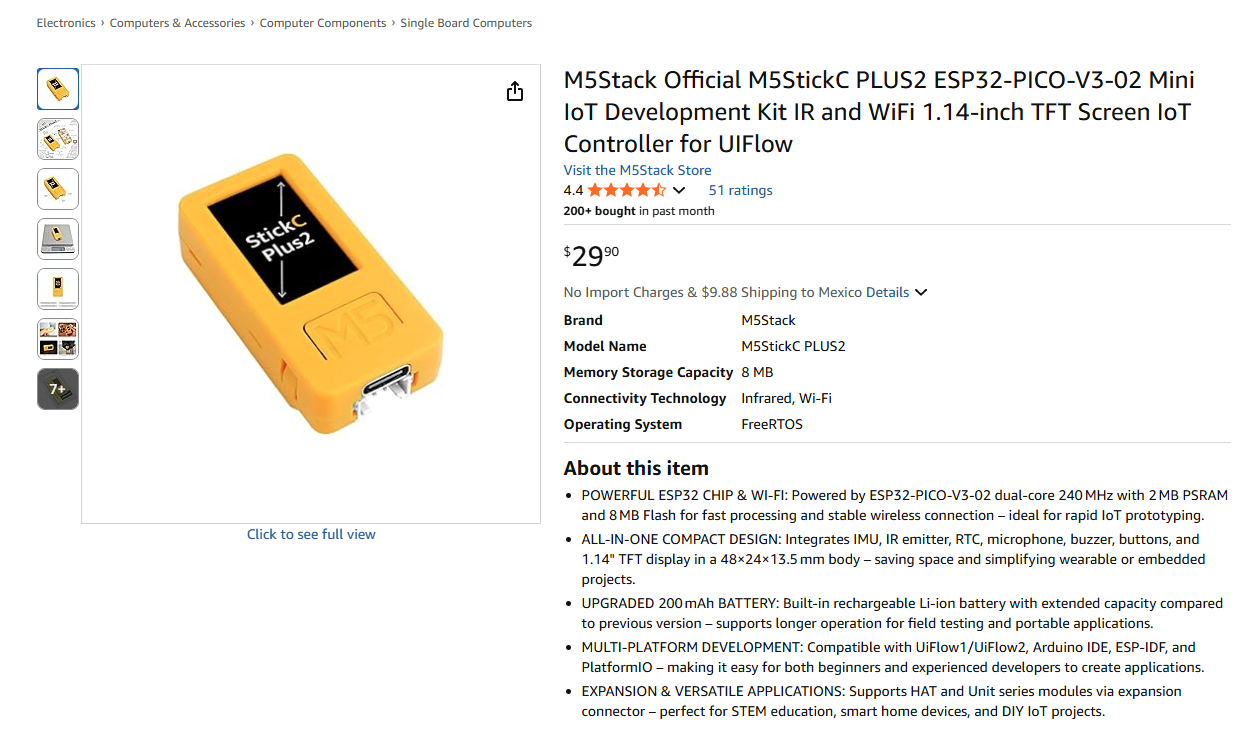
This device has different types of attacks aimed at Wi-Fi, Bluetooth and radio frequencies, among others. But the most prominent one here — as I mentioned before — is the Evil Twin Attack.
This is just one of many ways an attacker can get their hands on your data.
We must keep in mind that we are constantly exposed to various forms of scams and deceptions like these and we must defend ourselves, starting by avoiding connecting to unknown Wi-Fi networks.
Immediate Password Change!

As in the case illustrated above, we can fall for social engineering and phishing techniques in many other ways. Perhaps all of us, at some point, have received the classic email or message with subjects such as:
"URGENT DATA UPDATE"
"PASSWORD CHANGE REQUIRED"
or even an email like this one:
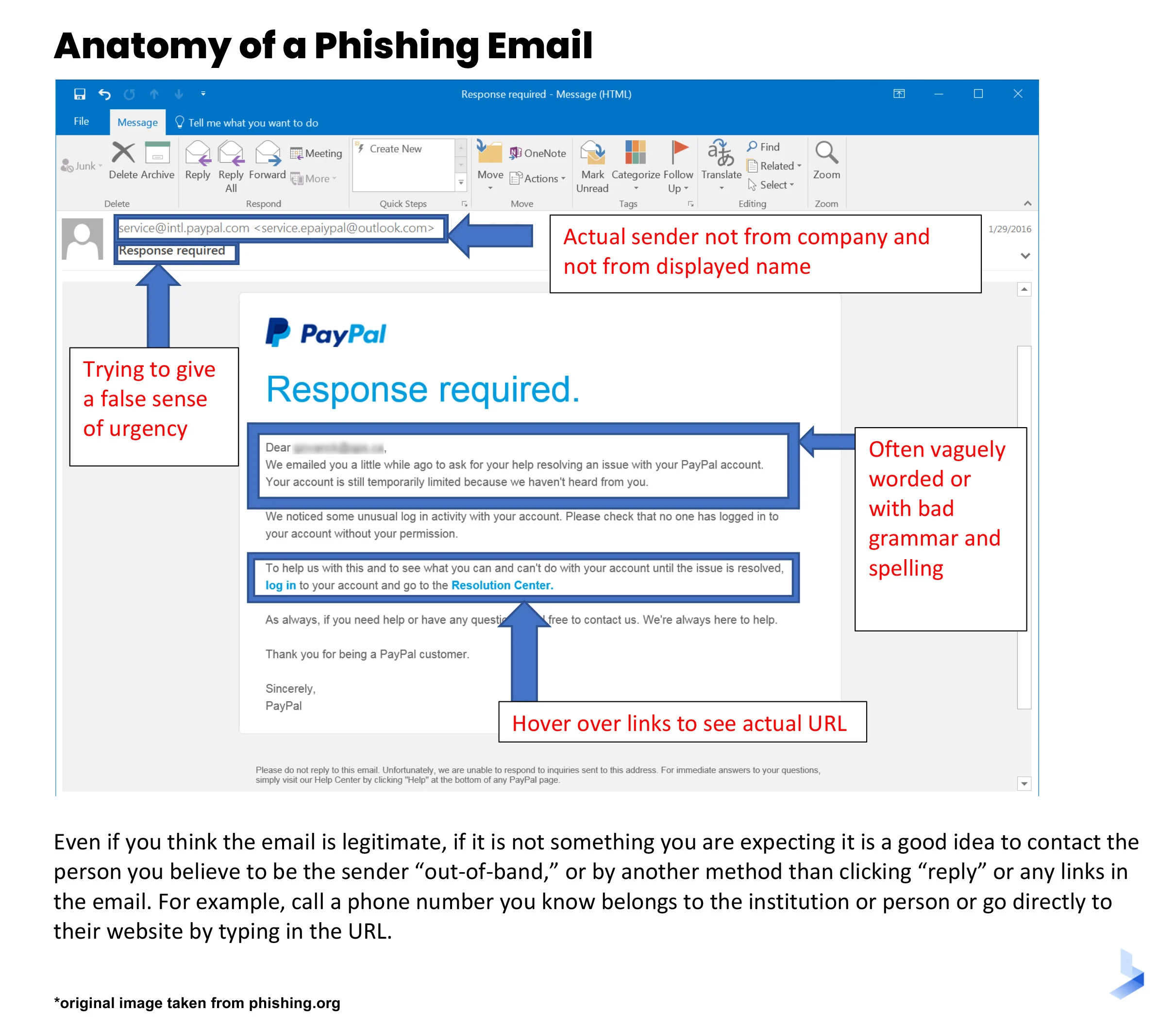
Phishing can come in many forms: incredible offers, subtle suggestions, or even threats. Examples of wording used in phishing emails include:
IMMEDIATE PAYMENT REQUIRED!
YOU'VE WON THE NEW iPHONE!
INVEST IN CRYPTOCURRENCIES AND RECEIVE DOUBLE YOUR INVESTMENT INSTANTLY!
Emails of this type can be very convincing when you review them and click on the links they include but don’t be fooled. Always compare your emails with alternate sources. For example, if you receive an "immediate pay" email, verify by calling your bank directly.
Before clicking on a link, think and double-check.
To Publish or Not to Publish? That Is the Dilemma

Facebook, Instagram, X (Twitter)...
Social networks are part of our daily lives, whether to stay in touch with our friends and family, learn about the latest gossip or news, or simply distract ourselves.
Through these social media outlets, we can see everything that is happening around us without leaving our homes, and in the same way, we ourselves share what we do, how we feel, and to interact with others. .
That's why they're called social networks: to connect with others, to know what they’re doing, and let them know about us. But have you ever wondered what kind of people are hanging around your social networks? Do you know all of your "friends" on Facebook well? Do you know who sees your posts on Instagram? And importantly, have you implemented any privacy settings to control who can see your posts?
It's very easy — and the truth is, it fills our egos a bit — to send and accept friend requests from all kinds of people. The more people that see me, and the more people that react to my posts and photos, the better it makes me feel. We love attention and for others to see where we're going, what we're eating, what movie we're going to watch or what book we're going to read.
Two important questions that you need to ask yourself:
Who are my friends?
And what kind of privacy controls do I have when I post something?
We must understand that not all people have good intentions, and above all, there is always someone who will want to take advantage of what we share online.
A very common occurrence, due to the lack of privacy measures, is identity theft. This occurs when a person impersonates another through a fake profile, in order to deceive the user’s followers. The goal is usually to target the people this user knows, and leverage impersonation to obtain confidential information or convince them to participate in some type of fraud.

It's very easy to access the profile of someone who doesn't have proper privacy settings, download their photos, view and copy their personal information — such as their name, where they live, or what they do for a living — and obtain any other data that makes a fake account look almost the same as the original one at the time of the impersonation.
To prevent identity theft and spoofing, you should maintain a high level of privacy on all of your social media networks and be careful about the people that you accept as friends.
Recommendations
The following recommendations can help users avoid falling for scams such as the Evil Twin, phishing emails or identity theft.
Evil Twin
Avoid, as much as possible, connecting to public Wi-Fi networks, especially if they don't have a password.
Sign up for VPN services like NordVPN so that you can connect to public Wi-Fi networks more securely.
Keep your phone and computer always updated , in addition to installing an antivirus.
Always access websites with https and avoid http websites.
Never enter sensitive information, such as your email accounts or passwords, on sites that you don't know.
Always use multi-factor authentication (MFA), using apps such as Google Authenticator or Microsoft Authenticator.
Phishing
When you open a suspicious email, verify different aspects carefully, such as:
The title.
The sender.
Writing, such as spelling mistakes and grammar.
Always check the veracity of the message:
For example, if you're asked to change your Google Account password, never do it using the provided link within the email. Instead, do it directly from the official Google portal.
Never click on links or download files from unknown senders.
Never reply to emails with sensitive information, such as passwords or personal data.
Use the "Report Phishing" button to report suspicious emails.
Impersonation
Ensure that you know who you’re sending and receiving friend requests from.
Set your social networks to private, so that only your followers or friends can see your posts.
Omit sensitive information that others don't need to see, such as:
Date of birth
Email address
Phone Number
School or current job
Never share ID documents, such as:
Credential or card
Passport
Driver's license
Event Tickets
Avoid posting where you are or where you're going. Sharing your location can facilitate fraud.
In an increasingly connected world, protecting our personal information is essential. Attacks like the Evil Twin, phishing, and impersonation may seem unlikely, but they're just a click away. Prevention starts with awareness and responsible use of our networks and devices. Remember: Your digital security depends on you.
Cybercrime Intelligence Shouldn't Be Siloed
Fortra® experts are dedicated to protecting organizations and the public by delivering the latest insights, data, and defenses to strengthen security against emerging cyber threats.