In today’s fast-paced digital world, we’re conditioned to solve problems quickly. A website says something went wrong? Follow the instructions. A download failed? Try the suggested fix. A CAPTCHA asks you to prove you’re human? Complete the verification.
But what if those instructions are the attack?
Welcome to the world of ClickFix scams, a growing social-engineering technique that turns a victim into an unwitting participant in compromising their own computer.
Watch the video below to learn about ClickFix scams.
What Is a ClickFix Scam?
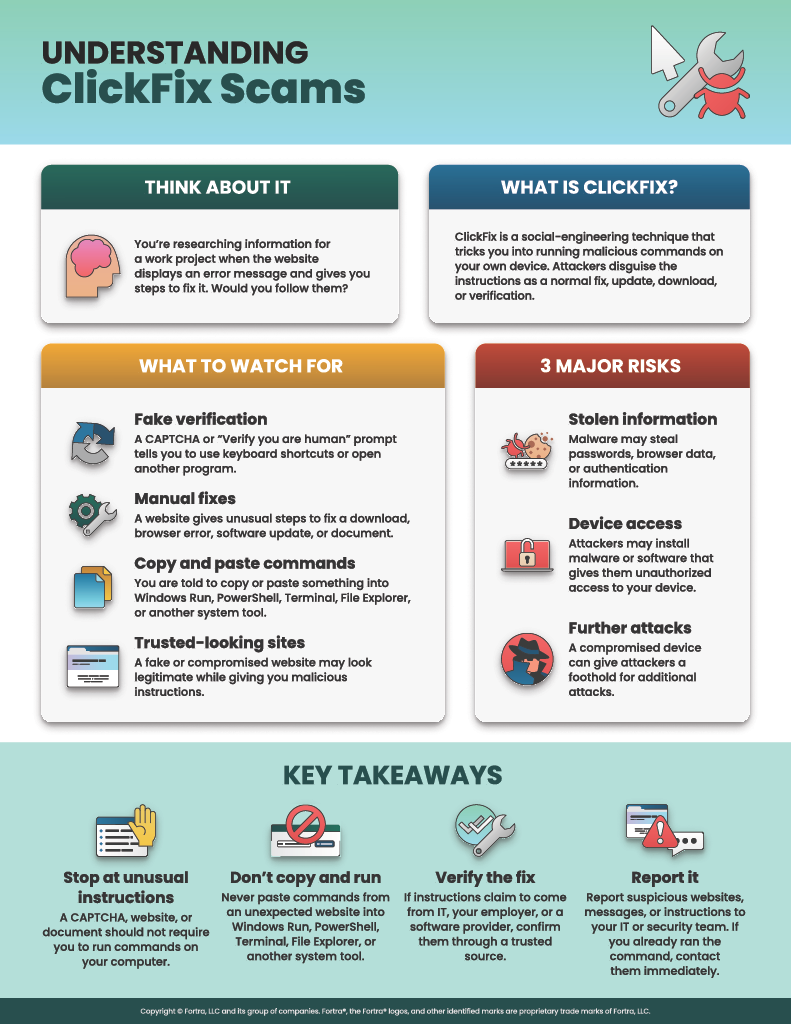
ClickFix is a social-engineering technique that tricks users into running malicious commands on their own devices.
Rather than relying solely on a malicious attachment or exploiting a software vulnerability, attackers present convincing instructions that appear to solve a problem or complete a routine task. The victim may be told to copy and paste a command into the Windows Run dialog, Windows Terminal, PowerShell, File Explorer, or, increasingly, macOS Terminal.
Attackers disguise these instructions as legitimate actions such as:
- Fake CAPTCHA or “Verify you are human” challenges
- Browser or software update notifications
- Download or document-access instructions
- Fake error messages and troubleshooting steps
- Security or account-verification prompts
- Compromised or counterfeit websites
- Phishing emails leading to fake verification pages
In many ClickFix attacks, clicking a button silently copies a malicious command to the computer’s clipboard. The victim is then instructed to paste and execute it.
The important warning sign isn't simply the click. It's being instructed by a website, email, document, or unexpected message to copy, paste, and run a command on your computer.
Anatomy of a ClickFix Scam
While individual campaigns vary, a typical ClickFix attack follows four stages:
- The Trigger: You encounter a convincing message such as “Verification required,” “Download failed,” “Your browser needs an update,” or “Complete these steps to prove you are human.”
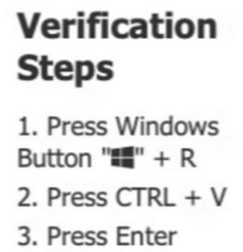
- The Hook: The page provides detailed instructions that appear legitimate. You may be told to click a button and then use keyboard shortcuts or open a system utility.
- The Payload: The attacker places a malicious command on your clipboard or provides one for you to copy. You are then instructed to paste and execute it using a trusted part of your operating system, such as the Windows Run dialog, PowerShell, Windows Terminal, File Explorer, or macOS Terminal.
- The Outcome: The command can download or execute malware, steal credentials and browser data, install remote-access software, establish persistence, or provide attackers with a foothold for additional attacks.
The dangerous part is that you execute the command yourself. Instead of breaking into the computer directly, the attacker convinces you to open the door.
Why These Scams Work So Well
ClickFix attacks combine psychological manipulation with the abuse of legitimate operating-system tools.
Psychological Triggers
- Urgency: “Complete verification to continue.”
- Frustration: “Your download failed. Follow these steps to fix it.”
- Authority: The page impersonates a trusted company or service.
- Familiarity: CAPTCHA challenges, software updates, and troubleshooting instructions are normal parts of using the internet.
- Curiosity: The lure may promise access to a document, video, message, or download.
Technical Deception
- Spoofed or compromised websites that appear legitimate
- Fake CAPTCHA and verification screens
- Commands automatically copied to the clipboard
- Obfuscated commands designed to hide what they actually do
- Trusted system utilities such as PowerShell, Windows Terminal, File Explorer, curl, or macOS Terminal
- Multi-stage malware delivery that may leave little obvious evidence on disk
Because the victim performs the critical execution step, ClickFix attacks can sometimes bypass defenses designed primarily to detect malicious attachments or automatically executed code.
ClickFix Is Evolving
ClickFix attacks have expanded significantly since they first gained widespread attention.
Fake CAPTCHA and Verification Pages
One of the most recognizable versions presents what appears to be a CAPTCHA or human-verification test. Instead of simply selecting images or checking a box, the site tells the user to perform additional steps, often involving keyboard shortcuts, the Windows Run dialog, or a terminal.
A legitimate CAPTCHA should never require you to open PowerShell, Terminal, Windows Run, or another system utility and paste a command.
FileFix
Attackers have also adopted a variation known as FileFix.
Instead of telling the victim to paste a command into the Windows Run dialog, FileFix can instruct the user to paste what appears to be a file or folder location into the Windows File Explorer address bar.
The text may look like a harmless file path, but the clipboard can contain a hidden malicious command. Pressing Enter executes the attack.
This is especially deceptive because opening File Explorer and entering a path can feel much more routine than opening PowerShell or a command prompt.
macOS ClickFix
ClickFix is not just a Windows problem.
Attackers are increasingly targeting macOS users, using fake software downloads, verification prompts, and error messages that instruct victims to copy commands into Terminal.
Some recent campaigns have even fingerprinted visitors before displaying the malicious instructions, allowing attackers to show a macOS-specific lure only to users who appear to be using a genuine Mac while showing security scanners and other visitors harmless or unrelated content.
What Can ClickFix Install?
ClickFix isn't a specific piece of malware. It is a delivery technique, meaning different attackers can use it to install different malicious payloads.
Security researchers have observed ClickFix campaigns delivering:
- Information stealers that target passwords, browser data, authentication cookies, cryptocurrency wallets, and other sensitive information
- Remote access trojans (RATs) that allow attackers to control compromised computers
- Malware loaders that install additional malicious software
- Remote monitoring and management tools abused to establish unauthorized access
- Persistence and defense-evasion tools
- Malware that can ultimately support ransomware and other follow-on attacks
Malware families associated with ClickFix campaigns have included Lumma Stealer, Atomic Stealer (AMOS), NetSupport RAT, XWorm, AsyncRAT, Latrodectus, SectopRAT, and others.
The payload can change quickly. The social-engineering technique is what remains consistent.
Real-World ClickFix Examples
- The Fake CAPTCHA: You visit a website and encounter a “Verify you are human” challenge. After clicking the verification button, you're instructed to press a keyboard combination, paste something, and press Enter. The pasted text is actually a malicious command.
- The Fake Download: A site tells you that a document, application, or media file cannot be downloaded normally. It provides a “manual” method that requires opening Windows Run, Terminal, or another utility and pasting a command.
- The Phishing Email: An email contains a link to a document, statement, shared file, or other resource. The link takes you to a convincing website where an error or verification process eventually instructs you to execute commands on your computer.
- The FileFix Lure: A website tells you to open a file or perform an environment check by pasting what appears to be a file path into Windows File Explorer. The clipboard actually contains a disguised command that executes when you press Enter.
- The macOS Lure: A fake software download or verification page tells a Mac user to open Terminal and paste a command to complete an installation or resolve an error. Instead, the command downloads and executes malware.
Remember: A website should not need you to open PowerShell, Command Prompt, Windows Terminal, Windows Run, File Explorer, or macOS Terminal and execute a command to prove you're human, download a file, view a document, or fix a browser problem.
What to Do If You've Followed the Instructions
If you clicked a ClickFix lure but did not paste or execute the command, close the page and report it according to your organization's security procedures.
If you pasted and executed the command, treat the computer as potentially compromised.
- Stop interacting with the suspicious page or instructions.
- Contact your IT or security team immediately.
- Tell them exactly what happened, including whether you opened Run, PowerShell, Terminal, File Explorer, or another utility and executed a command.
- Do not attempt to remove the malware yourself unless instructed to do so by your security team.
- Follow your organization's incident-response procedures.
For personal devices, use trusted security software and seek qualified technical assistance. Passwords and active sessions may also need to be reset after the device has been secured.
Acting quickly matters because modern information stealers can target not only passwords but also browser cookies and authentication tokens, potentially allowing attackers to access accounts even when multi-factor authentication is enabled.
How to Stay Protected
- ✅ Never paste commands from an unexpected website into PowerShell, Terminal, Windows Run, File Explorer, Command Prompt, or another system utility.
- ✅ Treat unusual CAPTCHA instructions as suspicious. Proving you're human should not require executing commands.
- ✅ Be suspicious of “manual fixes” for downloads, browser errors, software updates, or document access.
- ✅ Verify unexpected instructions through a trusted source, especially when they claim to come from your employer, IT department, software provider, or another trusted organization.
- ✅ Keep operating systems, browsers, and security software updated.
- ✅ Use multi-factor authentication (MFA) wherever possible, while remembering that some information-stealing malware can also target authenticated browser sessions.
- ✅ Report suspicious websites and messages to your IT or security team.
- ✅ Stop when instructions ask you to leave the browser and execute something elsewhere on your computer.
Pause. Verify. Protect.
ClickFix scams are dangerous because they turn normal security advice on its head. Instead of asking you to download an obviously suspicious program, the attacker may provide polished, step-by-step instructions and convince you to execute the attack.
The specific instructions will continue to change. Today it might be Win + R. Tomorrow it could be File Explorer, PowerShell, Windows Terminal, macOS Terminal, or another trusted system tool.
The best defense is recognizing the underlying behavior:
If a website, CAPTCHA, email, document, or unexpected message tells you to copy and paste a command into your computer to fix, verify, install, or unlock something, stop.
Pause. Verify. Protect.