Email spoofing is a cyberattack technique in which attackers forge the sender address of an email to make it appear as though it was sent by a trusted source. This tactic is commonly used in phishing attacks and spam campaigns to trick recipients into opening messages, clicking malicious links, or sharing sensitive information.
As one of the most widespread forms of email-based cybercrime, email spoofing plays a central role in phishing, business email compromise (BEC), and other social engineering attacks. Because spoofed emails often mimic legitimate brands or individuals, many users encounter them without realizing the message is fraudulent.
While brand spoofing remains a major threat, cybercriminals are increasingly impersonating individuals—such as executives, employees, or partners—to carry out targeted attacks. These personalized spoofing attempts are more convincing and can lead to financial loss, data breaches, and reputational damage.
Understanding how email spoofing works is critical for improving email security, preventing phishing attacks, and protecting both organizations and their customers.
Examples of Email Spoofing
Some of the most prevalent forms of email spoofing are:
- Business email compromise, such as executive spoofing or display name deception
- Legitimate domain or look-alike domain spoofing
- Spear phishing, including social engineering, like this real example of a mortgage company targeting the recipient to download documents on a fake site:

Example of Email Spoofing Using Display Name Deception
Display name deception is one of the most common forms of email spoofing and is often effective because many email clients — especially on mobile devices — display only the sender’s name, not the full email address. This allows attackers to impersonate trusted individuals or brands by simply changing the display name.
In these attacks, criminals may use the name of a company executive, colleague, or well-known organization such as a bank or service provider to make the message appear legitimate. Because the underlying email address may go unnoticed, recipients are more likely to trust the message and take action.
Since common consumer mailbox services, such as Gmail and Yahoo, allow a user to specify any value in the display name, this type of attack is simple and cheap to stage from such a service. Here is an example of a brand display name imposter below:

Example of Email Spoofing Using Legitimate Domains
In addition to manipulating the display name, an attacker may use the actual email address of the impersonated identity in the From header, such as “United Customer Service” <[email protected]>. This type of attack, known as domain spoofing, does not require compromising the account or the servers of the impersonated identity, but exploits the security holes in the underlying email protocols. Attackers often use public cloud infrastructure or third-party email sending services that do not verify domain ownership to send such attacks.
Email authentication standards, such as DMARC, can be used by a domain owner to prevent spoofing of their domain, but have still not been adopted widely by many retail companies, Fortune 500 businesses, and government organizations.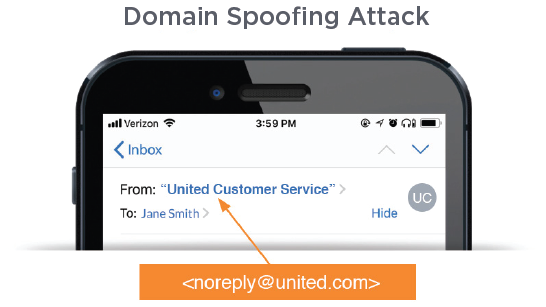
Year after year, the effectiveness of spoofing remains clear. Beyond email-based attacks, brand and executive impersonation account for a significant share of social media threats, making up nearly 41% of attacks in Q2. Fraud-related activity follows closely at around 40%, representing an increase of more than 5% from Q1.
Example of Email Spoofing Using Lookalike Domains
When domains are protected with email authentication and direct domain spoofing is blocked, attackers often turn to lookalike domain attacks. In these cases, they register domains that closely resemble a legitimate one to deceive recipients. These types of attacks, known as lookalike domain attacks, often use homoglyphs or characters that appear similar to the original characters in the impersonated domain. Attackers can use rendering similarities, such as “PayPal” <[email protected]>, exploiting the specific fonts and rendering styles used in popular email clients. Another variation of the lookalike domain attack is to add additional words to the domain name.
For example, if an attacker wanted to send you a bogus invoice from Acme Corporation, whose domain might be acme.com, the attacker could simply register acme-payments.com or invoices-acme.com. Finally, attackers can use characters from another script in the Unicode set. Cyrillic is a common choice, as in the 'From' header “Dropbox” <notifications@ dropbox.com>, where the “o”s in the domain are actually Cyrillic characters, but an email client will render the version that looks exactly like the impersonated domain.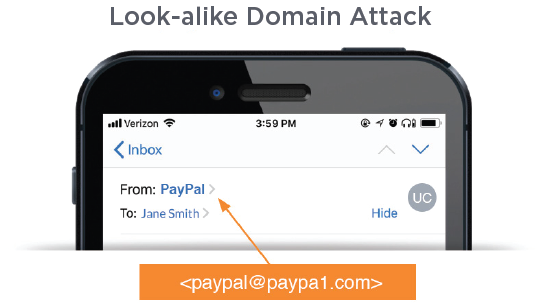
Example of Spoofing Using BEC
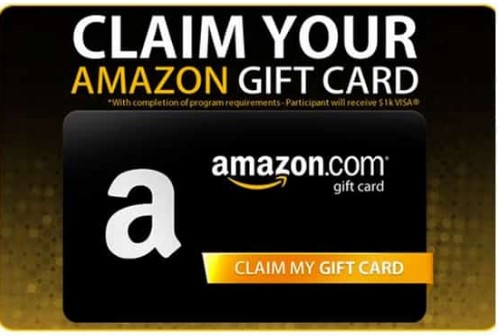
In recent years, business email compromise (BEC) attacks have increased significantly. These attacks often involve impersonating executives — such as CEOs or CFOs — to trick employees into initiating wire transfers, purchasing gift cards, or sharing sensitive information.
Rather than relying solely on email spoofing, attackers frequently use lookalike domains or compromised accounts to make messages appear legitimate. These emails are typically sent to executive assistants, finance teams, or junior employees and are crafted to create urgency and bypass normal approval processes.
Preventing Email Spoofing
While it is not possible to completely prevent cybercriminals from attempting email spoofing, organizations can significantly reduce risk by blocking these messages before they reach employee, customer, and partner inboxes.
A combination of email authentication protocols (SPF, DKIM and DMARC) and identity detection methods (i.e., brand and executive impersonation) can help ensure that spoofed emails are detected before they ever reach the inbox. These controls make it much harder for attackers to successfully impersonate trusted senders at scale.
In addition, ongoing security awareness training helps users recognize suspicious messages and respond appropriately. Together, these layers form a comprehensive defense strategy against email spoofing, brand impersonation, and identity deception, ultimately helping restore trust in the inbox.