Table of Contents
The Cloud-Based Productivity Promise of Microsoft 365
Today’s Threat Environment Poses No Shortage of Business Risks
Inadvertent Data Sharing – Accidents will Happen
Preventing Data Leakage via Email
Where Microsoft 365 Security Falls Short
Become a Zero-Compromise Enterprise
Plugging Information Security Gaps in Microsoft 365
The Cloud-Based Productivity Promise of Microsoft 365
With its integrated applications and intuitive capabilities, Microsoft 365 (previously Office 365) has steadily become a corporate productivity juggernaut since its introduction in 2011. In fact, Microsoft's January 2023 Shareholders' meeting just reported more than 63 million subscribers for M365.
M365 offers multiple tiers of capabilities that all leverage the cloud to enable professionals around the globe to create and communicate with ease. But do the native capabilities of the application offer the information security and effective cyberattack prevention required in today’s threat environment?
In this guide, we’ll examine the cybersecurity functionality built into M365 and where it falls short when considering the strength of security postures required to meet the increasing level of risk we face today.
Today’s Threat Environment Poses No Shortage of Business Risks
It’s no secret that cyber attacks are a constant threat to businesses and their sensitive information. When it comes to M365, cybercriminals are advancing across several fronts, using different techniques to gain access to valuable data. Some of these techniques include:
Phishing Scam
It’s becoming increasingly difficult to spot phishing campaigns geared toward M365 users due to their clever—and realistic—appearance. These masquerade as an innocuous-seeming communication, such as a meeting request from a co-worker or a false live chat. Once the user clicks on the link, he or she is redirected to the phishing site disguised as a M365 page.
Malware
When sent from what looks like a legitimate email address, malware embedded in images or documents can quietly infiltrate a network once a recipient opens the file. This can even happen in preview mode, a security flaw within M365, which doesn’t check a document’s source prior to launching the preview. Malware is often hidden in documents that employees are accustomed to seeing every day.
For example, a PDF of a purchase order could be sent to Finance, or a resume may be emailed to an HR rep. The danger is the recipient has no idea anything is amiss, and these threats can infiltrate a network for days, weeks, or months before they’re discovered—if they’re discovered.
Augmenting M365's Supposed Security
In early 2022, a researcher from WithSecure, a cloud and endpoint protection provider, discovered an unpatchable flaw in Microsoft Office 365's Message Encryption (OME), which enabled a hacker to infer the contents of encrypted messages, implying that the platform could be leaving encrypted emails vulnerable to decryption by hackers at a larger scale.
Even worse, though the discovery of the vulnerability was shared immediately with Microsoft when it was identified, they did nothing at the time by way of issuing a fix besides acknowledging the researcher via its vulnerability reward program.
Inadvertent Data Sharing —Accidents Will Happen
Other situations highlight accidental, but no less harmful, forms of having the wrong information sent to the wrong person. Perhaps an account rep shares a file with a customer and doesn’t realize there’s sensitive PCI, PII, or IP data in a hidden column of a spreadsheet. Or a CEO doesn’t realize there is sensitive metadata in the properties field or unaccepted changes still present in the version history of an M&A report.
Perhaps pricing information for one organization isn’t deleted from a proposal given to another. And finally, a high-ranking military defense employee could share a document with a photo without realizing the image contains embedded top-secret location information.
Additionally, in the wake of the COVID-19 pandemic and the dramatic increase in the number of employees remotely, many businesses are overlooking security protocols in favor of rapid M365 deployment, leaving them more vulnerable to attack. In fact, as recent as December 2022, CISA's Vulnerability Bulletin reported 8 remote code execution vulnerabilities in M365 in one week alone!
Implications of a Data Breach
No matter how it is lost, when data ends up in the wrong hands it can cost the organization greatly. Costs include ransom demands from perpetrators and fines from regulatory bodies for non-compliance with data privacy laws.
Cyberattacks with the intention to cause disruption can wreak havoc with internal operations which often leads to customer-facing downtime. All these implications can cause damage to your reputation and ultimately lead to a loss of customers.
Preventing Email Data Leakage
To avoid the risk of a data breach, organizations need to secure their business communication channels.
Data leakage through email is commonplace and to minimize the risk, email security tools need to scan deep into messages and attachments to identify any sensitive or critical information before it leaves the organization and ensure that any unwanted data is not received.
M365 is good for dealing with spam and malware and does offer various levels of email security, such as tools to deal with regulatory control through archiving and basic encryption. Template rule sets are provided to get you started with policies, but these typically do not deliver the deep content inspection required to remain truly secure.
Where M365 Security Falls Short
Become a Zero-Compromise Enterprise
Fortra Advanced Email Security offers a more comprehensive, secure solution than M365 alone—an important consideration for any IT security professional balancing sensitive and critical information protection and control, with an increasingly cloud-centric infrastructure.
By implementing Fortra Secure Email Gateway in conjunction with M365, you will have the missing element required for a robust, comprehensive security posture. And when paired with the additional benefits of Adaptive Redaction, your organization can rest assured knowing sensitive and critical information is secure within the M365 framework. There’s no need to compromise collaboration for security as this approach offers the best of both worlds.
Fortra Secure Email Gateway covers all the bases. It features a Deep Content Inspection engine that thoroughly examines message headers, subject lines, message bodies, attachments and contents, image scanning, document headers and footers, and even the metadata within documents. This maximizes the chances of capturing sensitive content such as credit card numbers and banking codes, confidentiality clauses and profanity, customer-defined and regular expressions, and Boolean and positional operator-based expressions.
Furthermore, the solution can be used to monitor and control internal email, providing granular controls and advanced data loss prevention functionality to prevent unauthorized data sharing within your business. While organizations control access to file servers and other collaboration services in recognition of the fact that not all information should be available to all people, internal email traditionally lacks these restrictions. This means any employee can send anything to another person inside the organization. Fortra Secure Email Gateway mitigates this type of risk.
Adaptive Redaction at a Glance
Adaptive Redaction technology is unique to Fortra and provides cybersecurity protection for email without impacting on productivity. In real time it removes only the information that would cause a data breach or cyberattack, allowing the rest of the communication to continue to its destination. The sender would be notified of the infringement to help inform future choices. Its three main features include (and can be applied to both incoming, outgoing, and internal traffic):
Data Redaction

Redaction capability in Word, Excel, PowerPoint, and PDF files, as well as email messages to remove sensitive data (e.g., PII, PCI, etc.)
Document Sanitization

Sanitization capability includes the removal of tracked changes and properties information.
Structural Sanitization

Sanitization capability to remove active content and other malicious components from files (e.g., APTs, ransomware, etc.)
Plugging Information Security Gaps in M365
Introducing Fortra's technology enables your organization to take a strong stance against cyberattacks and data loss. This is possible with capabilities and controls that close gaps against the efforts of external cybercriminals as well as malicious—or well-meaning, but careless—employees.
Integrating M365 with Fortra Secure Email Gateway
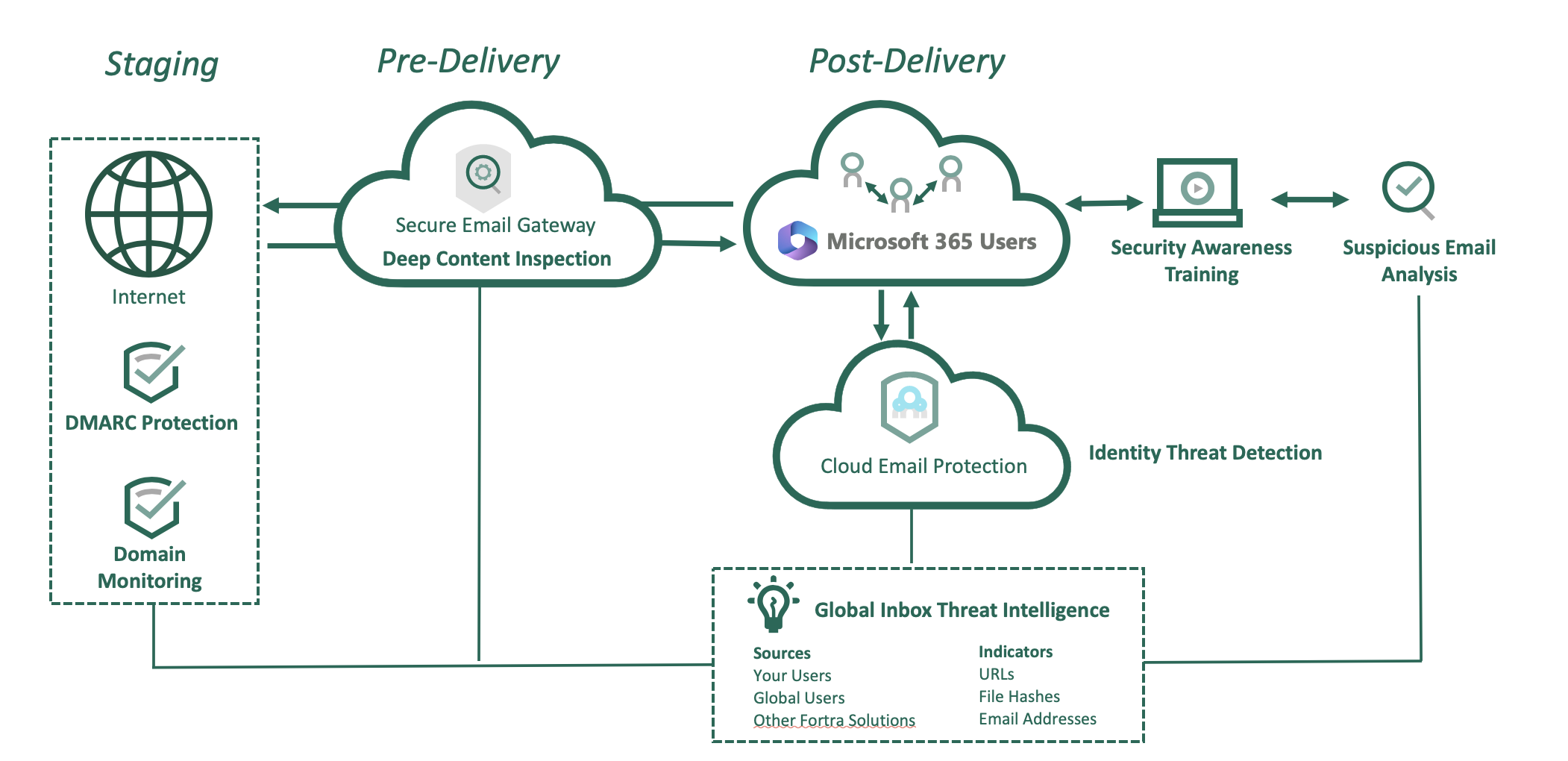
Fortra Secure Email Gateway, along with our leading integrated, cloud-based email security solution, Fortra Cloud Email Protection, as well as Fortra DMARC Protection, Fortra Suspicious Email Analysis, Fortra Domain Monitoring, and Fortra Security Awareness Training, can all integrate with M365 to fill email security gaps.
Fortra's comprehensive email security solution suite can be deployed alongside M365 to ensure your organization’s valuable information remains secure—whether it’s housed on-premise, in the cloud, or in a hybrid environment.
Additional considerations as illustrated the graphic above:
- Email traffic scanning: Fortra Secure Email Gateway can scan inbound, outbound, and internal email traffic for comprehensive protection.
- Hybrid deployments: Fortra solutions can be deployed as a hybrid configuration if your organization uses both M365 and an on-premise email solution.
- An adaptive approach: M365 offers a comprehensive hosted email and SharePoint solution with variable levels of security. To truly feel confident your sensitive and critical information is secure, it’s important to enhance these security capabilities with an adaptive approach.
Summary
With cybercriminals becoming increasingly savvier in their delivery of sophisticated threats, and data protection laws becoming tighter, organizations that store and process sensitive and critical information in M365 need to weigh the benefits of the platform and the cyber risks associated with it. Even with the most advanced offering, the Microsoft solution still has security shortfalls that need to be plugged.
Fortra Advanced Email Security solutions offer the proven comprehensive security solution you need to integrate seamlessly with M365 to enable advanced threat and data protection. The powerful combination of Fortra alongside M365 technologies closes security gaps and mitigates risk for your business.