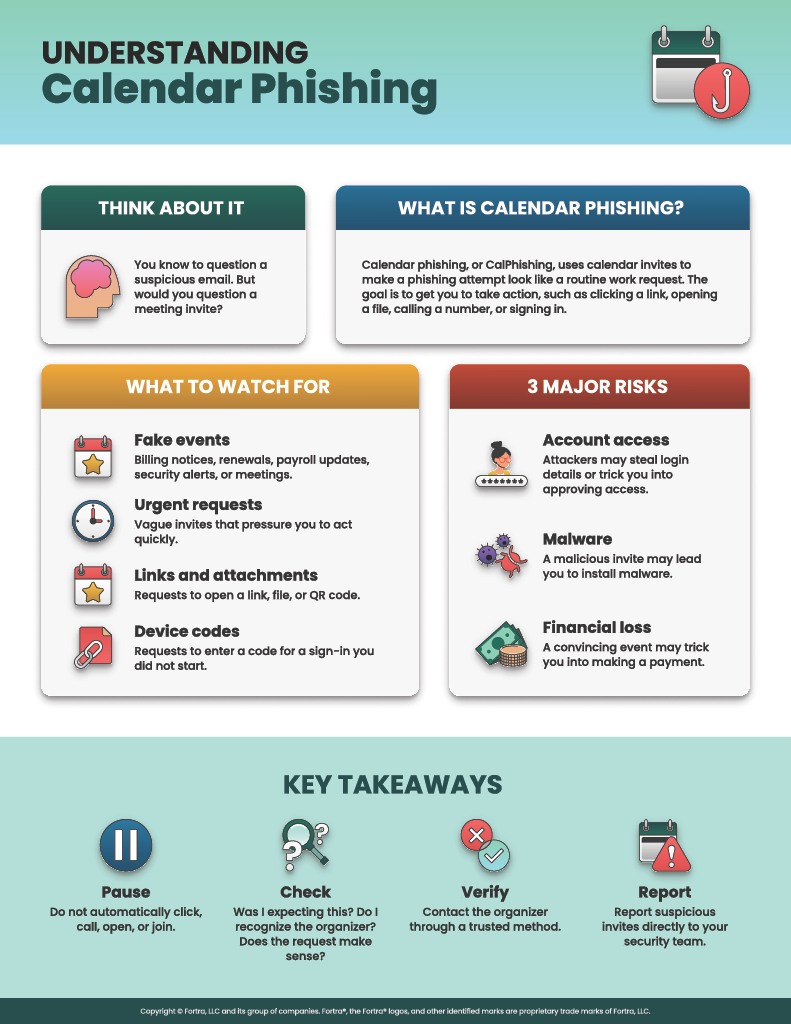
Most people have learned to pause when an email asks them to act quickly. We check the sender, look at the link and question the urgency.
Here is where a CalPhishing comes in: a calendar reminder often gets a different response, it looks like part of the working day, so we are more likely to act. The validation steps we know do not apply as closely anymore.
Attackers know this:
Calendar phishing, or CalPhishing, moves the lure from the inbox into a calendar invite. KnowBe4 reported a 49% increase in calendar invite phishing over the six months covered by its 2026 threat-trends research. For Cybersecurity Awareness Month, that is a useful reminder: phishing no longer focuses on the inbox.
What Is Calendar Phishing?
A calendar invitation is not dangerous by itself. The problem is how an attacker can use a familiar feature to create trust and prompt an action.
CalPhishing can arrive as a direct meeting request, an iCalendar (.ics) file, an invite sent from a legitimate vendor or compromised account, or side-loaded via browser. Depending on the message type, calendar client and filtering, a meeting request can appear as a tentative event before the recipient accepts it, via the meeting auto-processing default enabled client rules.
The email itself may say very little. The hook may sit in the event title, description, location, attachment or organizer details. It might look like a failed Microsoft 365 renewal, an expiring domain, an invoice or signature request, a security briefing, a payroll update, or a normal online meeting.
In the campaigns Fortra observed, calendar clients rendered standard calendar data as designed. The attacker abused a familiar workflow rather than exploiting the software.
Why CalPhishing Works
Trust and Comfort: It is a safe space (wrong)
A meeting request arrives inside a tool people use all day. The notification looks native, the time creates urgency and the subject often resembles a routine business task. Users may scrutinize a strange email but are more likely to give a calendar reminder the benefit of the doubt.
Persistence: The event can outlive the email
An invite can keep working after the email is gone. In Fortra Intelligence and Research Experts (FIRE) testing, moving the delivery email to Junk or soft-deleting it did not remove the associated meeting entry. The event and its reminders stayed visible, giving the lure another chance to appear later on a phone, teams, desktop or other calendar sync-ed apps.
Authentication: A real sign-in page can still be part of the trap
Some campaigns combine CalPhishing with a device-code phishing technique described in the cited research as ConsentFix. The attacker or attacker-controlled infrastructure initiates a Microsoft OAuth device-code flow and gives the victim its user code. If the victim enters that code and completes authentication on Microsoft’s genuine device sign-in site, access and refresh tokens are issued to the attacker-controlled client.
MFA may still be completed successfully. The victim has been socially engineered into authorizing the attacker’s device-code flow. The fake part is the story that leads to the page, not necessarily the Microsoft sign-in page itself.
What Can CalPhishing It Look Like?
There are 4 main types noticed.
Examples seen in recent campaigns include:
- Invitations sent through legitimate platforms, with links to fake documents hosted on legitimate platforms that lure the user towards a sign-in flows.
- HTML in the invite body being sent by using Compromised accounts (third party vendors, customers or random), target being to make the event look like an official notice or business request.
- Events containing a branded notice or an HTML attachment that opens a targeted login page.
- Harmless-looking invites used to build familiarity before a later message, file share, second invitation or other social-engineering step.
The details vary, but the tactic is the same: make the next action feel routine.
Warning Signs to Check
Pause when an invitation has one or more of these features:
- You were not expecting the meeting or do not recognize the organizer.
- The organizer's full address or domain does not match the display name.
- A billing, renewal, payroll, signature or security alert is presented as a meeting.
- The agenda is vague, but the request demands immediate action.
- The event asks you to open a link or attachment, scan a QR code, call a number, download an update, or authorize and enter a device code flow.
- The branding looks familiar, but the business context does not make sense.
Ask the obvious question first: would this person or team normally contact me this way?
What Employees Should Do
- Pause before accepting or acting. Do not click Join, open an attachment or call a number simply because it appears in a calendar event.
- Verify through a known route. Contact the organizer using details you already have or open the official service through a known website rather than the invitation.
- Never enter a device code unless you personally started that sign-in on a device you recognize.
- Report the invitation using your organization's normal phishing process. Include the calendar event and the original email if both are available. Follow your security team’s guidance to remove the event itself.
- If you clicked, entered credentials, supplied a code or approved a sign-in, report it immediately. Quick reporting gives the security team time to contain the account, investigate sign-in and token activity, and check whether the event remains on other recipients’ calendars.
Why Individuals Are Still Targeted by CalPhishing
CalPhishing is not limited to the workplace. Personal calendars also hold appointments, social plans, events and everyday commitments, giving attackers plenty of believable reasons to make contact.
- Calendar notifications feel familiar and are easy to act on quickly.
- Calendar invites can appear across synced devices, giving the lure more than one chance to be seen.
- A convincing event can trick someone into entering key login details, making a payment or installing malware that gives an attacker access to their device.
- Teenagers can be susceptible too, through fake school, gaming or social invites that ask them to join a group, open a shared file or sign in.
Do not act directly from an unexpected calendar invite. Contact the sender using details you already trust or visit the official website yourself.
Security Teams Should Not Stop at the Inbox
Calendar phishing crosses email, calendars, web activity and identity. Security teams should inspect .ics content, links and attachments; review and test how external invitations are filtered and automatically added across the clients and mailbox types they support; and correlate the event with email, browser and sign-in logs. Do not assume mail remediation removed the calendar entry. Verify it and remove the event separately if needed.
Awareness training should also show what phishing looks like in calendars, groups, shared files and collaboration tools. Employees need a clear way to report unexpected invites and a safe way to practice doing it.
For more information on the mitigation steps, check the Fortra Research post: CalPhishing Research.
A Simple Habit for Cybersecurity Awareness Month
The goal is not to make everyone distrust every meeting request. It is to apply similar checks we already teach for email: Was it expected? Does the request make sense? Can I verify an unexpected meeting via separate means?
Calendar phishing works because it looks like a normal task waiting to be completed. Treat an unexpected invitation as untrusted until it is verified. Your calendar can tell you when something is scheduled. It cannot tell you who deserves your trust.