
Brief Overview
Browser extensions are powerful tools for productivity, but they are currently the "Wild West" of cybersecurity. By being selective about what you install and regularly cleaning your browser, you can close this backdoor before a hacker finds it.
This guide provides an overview of the browser extension threat landscape, including detection and threat hunting guidance with recommendations on specific response actions and general mitigation strategies.
Jump To: What are Browser Extensions? | Case Study | Broader Browser Extension Risk | Detection & Threat Hunting Playbooks | Mitigation Strategies | Conclusion
Executive Summary
Most of us use browser extensions for different reasons, either to block ads, manage passwords, or check our grammar easily, mostly being convenience-based actions. However, hackers are now exploiting these mini applications as a backdoor into your digital life. Since extensions live directly in your browser, they can bypass traditional security measures, steal your data, capture your passwords, redirect your searches/clicks and track your every move. The guide includes a deep dive on the GhostPoster extension and an overview of other high profile malicious browser extensions. Threat indicators and recommendations are included throughout and at the end of the guide.
Why Are Extensions Dangerous?
When you install an extension, you often grant it permission to access all your data on every website you visit. It’s like giving a stranger a key to your house. Extensions can:
- Steal Session Tokens: Hackers don’t need your password; if they steal the "active session" that keeps you logged in to services like your bank or work email, they have direct access, called a “hot” browser session.
- Alter Content: Extensions can change what you see, such as replacing a legitimate "Pay Now" button with a fake one that sends funds to the hacker.
- Read Private Messages: Extensions can capture everything you type in Slack, Gmail, WhatsApp Web, or any other platform you use, bypassing end-to-end encryption.
How to Protect Yourself - As an organization or on a personal level
Traditional security software may not catch issues inside the browser. Follow these steps to safeguard your data:
- Audit Installed Extensions
Regularly review the extensions you have installed. Remove anything you don’t actively use or trust. Make it a habit to check this monthly. - Check "Last Updated" Dates
Ensure extensions are updated regularly. If you notice that one hasn't been updated in a while, it's best to uninstall it. If possible, consult your IT department or update them on a weekly basis. - Use Separate Browser Profiles
Keep your personal and work-related activities separate by using different profiles and devices, ideally sensitive and trusted access/searches on another profile from a research/regular use. This helps prevent a breach in one area from compromising the other. - Enforce Extension Control Policies (Default-Deny Approach)
Organizations should implement formal browser extension governance. Adopt a default-deny model that blocks all extensions unless explicitly approved. Establish a review board or designated security authority to evaluate extensions for security, privacy practices, permissions requested, update frequency, and vendor reputation before approval. Maintain and regularly review an approved extensions list.
For individuals, apply a similar mindset by only installing extensions that are absolutely necessary, verifying the publisher, and avoiding extensions that request excessive permissions unrelated to their function. A zero-trust mindset is the best approach - assume no extension is inherently safe, even if it has high ratings or many downloads.
A Deep Dive
1. What are browser extensions?
Browser extensions have become an integral part of both personal and enterprise workflows. From password managers and ad blockers to productivity tools and HR portals, extensions operate with deep access to browser sessions, user data, and cloud applications. This level of trust, combined with ease of installation and limited visibility by security teams, has made browser extensions an increasingly attractive attack vector for threat actors.
1.1 How the Browser Extensions Threat Evolved
Over the past year, malicious browser extensions have evolved beyond simple adware or nuisance behaviour. Recent campaigns show deliberate design choices aimed at evading detection, abusing legitimate browser APIs, and maintaining persistence within enterprise environments. Techniques such as code obfuscation, delayed execution, steganography, and staged payload delivery are increasingly used to bypass traditional security controls. In many cases, these extensions initially appear benign, pass marketplace reviews and stay dormant, and only activate malicious functionality after reaching the targeted installation or the right number of users. Often, these extensions are fully functional and legitimate, providing features that users expect thus removing suspicion.
1.2 Why Browser Extension Threats Are Particularly Dangerous
What makes browser extension threats particularly dangerous is their position within the browser itself. For the past decade, EDR platforms have become the primary endpoint control, built to detect malicious processes, binaries, and memory abuse, including fileless and Living-off-the-Land attacks. But extensions expose a fundamental blind spot into the detection systems. Extensions run inside legitimate browser processes, use approved APIs, and operate within authenticated sessions. From the endpoint’s perspective, it’s just normal browser activity, not a suspicious process or binary to flag.
As attackers shift into the browser and identity layer, EDR alone is no longer sufficient. The market response reflects this reality, with vendors expanding into secure enterprise browsers and browser-layer controls, such as Defender’s Browser Extension Assessment add-on.
2. Case Study: Dissecting GhostPoster Extension Malware
GhostPoster is a malicious browser extension campaign that showcases how threat actors exploit the trusted nature of extension ecosystems to gain stealthy, long-term access to user browsers. This attack leverages unconventional payload delivery, delayed execution, and dynamic command-and-control to avoid detection while operating at scale, typically evading traditional detection mechanisms.
2.1 Initial Access - Malicious Extension Installation
GhostPoster gains initial access by distributing seemingly legitimate browser extensions. Initially observed in Firefox, the campaign later spread to Edge and Chrome/Chromium-based browsers. These extensions promise helpful functions - such as password management, media downloaders, or productivity tools. Each comply with marketplace submission requirements, allowing them to pass initial reviews and be widely distributed as seemingly trustworthy.
This method allows for large-scale deployment without needing direct user exploitation or typical phishing techniques. Once installed, the extension operates as a persistent execution environment within the user’s browser, establishing a foothold for subsequent payloads, stage activation, and ongoing command-and-control communication.
MITRE ATT&CK
- T1189 - Drive-by Compromise
- T1195 - Supply Chain Compromise
2.2 Stage 1 - Steganography in PNG Icons
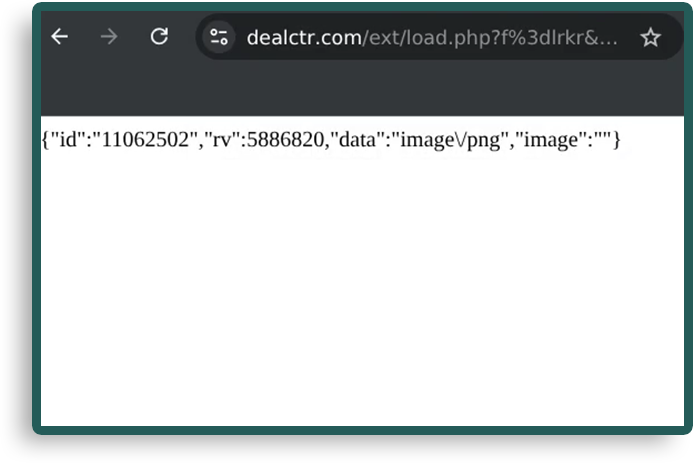
Technique: Attackers embed malicious JavaScript within the image files used by extensions, mainly in the extension’s logo.png. To the user, the image appears normal, but it conceals executable code.
Process: Common actions
- Upon installation, the extension extracts the hidden JavaScript from the PNG file at runtime, decoding it using a custom algorithm or library, and executing it in the browser environment.
- Why it Works: By hiding malicious code inside a seemingly innocuous file format and highly obfuscated staged payload, attackers evade static analysis tools and make the malware difficult to detect through basic file scanning or signature-based methods.
- Impact: This technique allows the attacker to initiate their attack without any visible signs of compromise on the user's system. Since the extension operates under the user's trust, the malware remains dormant until activated.
- Example: Pulling an extension image that contains a partial payload used to retrieve the full malware, a technique known as staged malware delivery.
MITRE ATT&CK
- T1027 - Obfuscated Files or Information -The attackers use steganography to embed malicious payloads in PNG files, making it difficult for signature-based scanning methods to detect the malware.
- T1071.001 - Application Layer Protocol: Web Protocols - After execution, the malware may initiate communication with the C2 server over HTTP/S or WebSockets, enabling further instructions or data exfiltration.
2.3 Stage 2 - Loader and Remote Payload
Technique: After the malicious code is extracted from the PNG image, a hidden loader is initialized within the browser’s memory. This loader periodically checks for updates or additional payloads from attacker-controlled servers, avoiding traditional disk-based detection mechanisms and logging, by operating entirely in memory.
Process: Common actions
- The loader communicates with the C2 infrastructure at random intervals, limiting its activity to roughly 10% of the time within a specified time window. This intermittent, low-frequency communication reduces the chances of triggering intrusion detection/prevention systems or other network-based defences that look for regular or high-volume traffic.
- Why it Works: By minimizing outbound communication and making it unpredictable, the loader bypasses detection tools that monitor for patterns in network traffic. This low-profile operation helps avoid detection by anomaly-based intrusion detection systems (IDS) and sandbox environments that flag consistent or repetitive network activity as suspicious.
- Impact: Operating silently, the loader avoids flooding the network with traffic, enabling the malware to scale across systems without triggering alerts. Once activated, it can download more sophisticated payloads, such as remote access Trojans (RATs) or data exfiltration tools, which enable further exploitation and persistence.
MITRE ATT&CK
- T1105 - Ingress Tool Transfer - The loader fetches additional malicious payloads from external C2 infrastructure over non-traditional channels, evading network-based defences.
- T1071 - Application Layer Protocol: Web Protocols (for C2 communication)
- T1497 - Virtualization/Sandbox Evasion (periodic, conditional execution) - The loader's limited, random execution reduces the likelihood of detection in sandbox environments or virtualized analysis setups that flag constant network activity.
2.4 Stage 3 - Obfuscation and Execution
Technique: To evade detection by automated analysis tools and traditional security mechanisms as well as reverse engineers, the malicious JavaScript code is obfuscated using various techniques such as case flipping, number swapping, Base64 encoding, and XOR encryption. These techniques hide the true intent of the code and make it harder for automated security systems and signature-based detection tools to identify malicious behaviour.
Process: Common actions
- The attacker employs these methods to obscure the code’s functionality. For instance, strings may be altered by flipping case, substituting numeric values, or encoding them in Base64, while XOR encryption is used to obfuscate the payload itself. This multi-layered obfuscation approach makes it difficult for automated scanners, heuristic tools, or pattern-matching algorithms to detect the malware, as it doesn’t conform to known signatures.
- Why it Works: Obfuscation prevents detection systems from recognizing malicious patterns in the code, making it challenging for automated analysis tools to flag the malware as suspicious. XOR encryption, especially when combined with other techniques, adds another layer of complexity, forcing detection systems to perform additional analysis steps before identifying the true payload. The primary goal is to make it time-consuming and resource-intensive for security tools to flag or respond to the malware.
- Impact: By evading detection mechanisms, obfuscation increases the malware’s persistence on the infected system. Since automated detection and signature-based systems are less effective, the malware can remain undetected for extended periods. Additionally, it complicates efforts to develop effective signatures for future detection, allowing the threat to persist and potentially evolve over time.
MITRE ATT&CK
- T1027 - Obfuscated Files or Information
- T1059.007 - Command and Scripting Interpreter: JavaScript
- T1071.001 - Application Layer Protocol: Web Protocols (used in encrypted payloads or hidden C2 communications)
- Browser hijacking: Redirecting user traffic to attacker-controlled websites or fake login pages (phishing). This is achieved through injected JavaScript that alters the user’s navigation or redirects clicks.
- Affiliate link manipulation: Replacing legitimate affiliate links with malicious ones to generate illicit profits for the attacker, often by dynamically modifying URLs in real-time.
- Tracking injection: Injecting tracking pixels into web pages, primarily for ad fraud or malicious tracking, which can also collect sensitive information like browsing habits or login credentials.
- Security header stripping: Removing HTTP security headers, such as Content-Security-Policy (CSP), that protect against cross-site scripting (XSS) attacks, weakening browser defenses and facilitating further exploitation.
- Iframe abuse: Injecting hidden or deceptive iframes into web pages that load additional malicious content, such as exploit kits or phishing pages, without the user’s knowledge.
2.5 Stage 4 - Payload Capabilities
Technique: After successful activation, GhostPoster executes a range of malicious actions designed to manipulate browser functionality, steal sensitive data, and disrupt user activity. These actions typically unfold in stages and focus on exploiting the trust granted to browser extensions.
Process: Common actions
- Why it Works: These actions leverage the elevated permissions granted to browser extensions, enabling them to interact directly with the browser’s content and web traffic. Since extensions are trusted components, they can manipulate user activity, inject malicious content, or steal data without raising alarms from traditional security tools. The manipulation of HTTP headers and URL structures also bypasses many web application security controls.
- Impact: This stage has immediate and severe consequences for users. For instance, affiliate link manipulation directly impacts users by redirecting legitimate traffic to attacker-controlled sites, leading to financial fraud and illicit profit generation. Browser hijacking facilitates phishing and credential theft, allowing attackers to steal sensitive login information. The injection of tracking pixels compromises user privacy, often collecting personal data or login credentials for malicious purposes. Meanwhile, iframe abuse can lead to further exploitation by loading additional malicious content, including ransomware or exploit kits, potentially compromising other trusted websites.
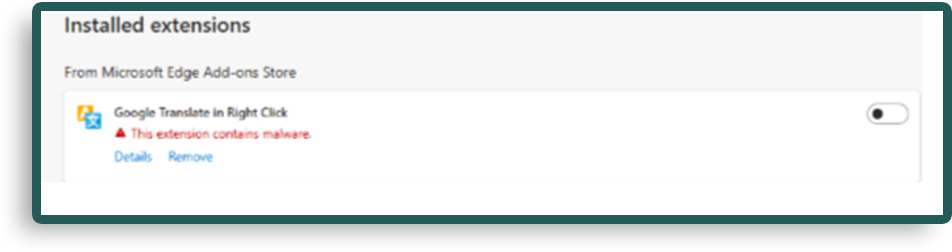
- Example: Visual confirmation via Defender Detection for Edge
MITRE ATT&CK
- T1071.001 - Application Layer Protocol: Web Protocols
- T1090 - Proxy: GhostPoster may use proxy techniques to anonymize its C2 traffic, avoiding detection by network-based security defences.
- T1486 - Data Encrypted for Impact (for injected or malicious tracking data)
- T1489 - Service Stop (via removing security headers or browser protections)
IOCs will be shared at the end of the article, so do keep reading! In the meantime, let’s deep dive into more browser extension risks and explore them.
. Broader Browser Extension Risk
The GhostPoster campaign is a representative example of the broader threat posed by malicious browser extensions. It highlights several key concerns that organizations must address to protect against this growing attack vector:
- Lack of visibility: Browser extensions can run with elevated permissions within the browser, allowing them to manipulate content and harvest data without raising red flags on traditional endpoint protection systems.
- Supply chain attack potential: Attackers can abuse legitimate software distribution channels (like the Chrome Web Store or Firefox Add-ons Marketplace) to distribute their payloads, often bypassing the initial security review processes.
- Evasion of security tools: The use of steganography, obfuscation, and intermittent payload execution allows extensions to avoid detection by traditional security tools, such as endpoint detection and response (EDR) systems, making them difficult to identify and mitigate.
Let’s look at other examples:
3.1 CrashFix Extension Malware
Overview over Crashfix/NexShield Extensions
CrashFix (also known as NexShield) is a malicious Chrome extension that disguised itself as a legitimate ad blocker. After installation, the extension would cause the browser to crash by exploiting vulnerabilities in Chrome's underlying architecture. When users attempted to recover their browsers by reinstalling or following prompts, the extension would silently deliver additional malicious payloads-notably, ModeloRAT, a remote access Trojan (RAT).
Key Techniques Used by CrashFix/NexShield
- Exploitation of Browser Crashes: The extension would intentionally cause crashes in Chrome, triggering recovery mechanisms in the browser. This method bypassed standard detection because it appeared as an accidental crash that users typically resolve with an extension reinstall.
- Fake Recovery Prompts: After the crash, users would be prompted to reinstall the extension or follow recovery instructions, at which point ModeloRAT would be delivered. This RAT allowed attackers to gain remote control of the infected system and collect sensitive data.
- Obfuscation: The extension initially appeared as a benign ad blocker, making it harder for users or security tools to detect malicious intent. It passed review processes, making it highly effective against unsuspecting users.
Key MITRE ATT&CK Techniques
- T1071.001 - Application Layer Protocol: Web Protocols (for C2 communication)
- T1105 - Ingress Tool Transfer (transferring malicious files)
- T1027 - Obfuscated Files or Information (obfuscating extension functionality)
- T1497 - Virtualization/Sandbox Evasion (exploiting crashes to avoid detection in sandbox environments)
IOCs for CrashFix/NexShield
- Malicious extension ID: mjgphdmbcbfhehkjpfgcldpjhfkgcdcn (found in Chrome extension store)
- C2 domains for ModeloRAT (could vary):
- http[://]34[.]76[.]135[.]123
- http[://]45[.]76[.]101[.]157
These C2 domains were linked to the ModeloRAT payload, used for exfiltrating sensitive information from infected systems.
3.2 Credential-Stealing Extensions Targeting Enterprise
Overview of Credential-Stealing Chrome Extensions
Credential-stealing Chrome extensions have become increasingly common, targeting enterprise tools such as HR systems (e.g., Workday, SAP SuccessFactors) and ERP tools. These extensions often masquerade as legitimate productivity tools, such as password managers or VPN extensions, but their primary purpose is to steal user credentials by hijacking authenticated sessions and collecting cookies.
How Credential-Stealing Extensions Work
- Browser Hijacking: The extension grants itself permissions to read and manipulate the contents of browser sessions. Once installed, it can observe and steal cookies, session tokens, and other authentication data associated with enterprise applications.
- Targeting HR/ERP Tools: Extensions specifically target platforms like Workday or SAP SuccessFactors, which are frequently used for accessing sensitive employee or financial data. This data can be exfiltrated or used for further attacks (e.g., payroll fraud, social engineering).
- Blocking Security Pages: To avoid detection by users or security tools, these malicious extensions often block access to security pages or authentication screens, preventing victims from noticing their sessions have been hijacked or stolen.
Example Attack with Credential-Stealing Extension
- A malicious extension that mimics a legitimate VPN tool is installed in an enterprise environment. It specifically targets HR and ERP platforms by harvesting credentials after the user logs in. These stolen credentials are then sent back to a C2 server controlled by the attacker.
MITRE ATT&CK Techniques
- T1071 - Application Layer Protocol: Web Protocols (for C2 communication)
- T1071.001 - Application Layer Protocol: Web Protocols: HTTP (specific targeting of HR/ERP login pages)
- T1555 - Credentials from Password Stores (stealing credentials directly from browser storage)
- T1539 - Steal Web Session Cookie (targeting cookies for session hijacking)
IOCs for Credential-Stealing Extensions
- Malicious extension IDs or names that have been reported:
- Extension IDs often change but can be found using extension tracking tools or reports from security vendors.
- C2 domains where stolen data may be exfiltrated:
- http[://]newloginserver[.]com
- http[://]accessportal[.]net
3.3. ShadyPanda (The "Sleeper Agent" Tactic)
Overview of the ShadyPanda Extension Campaign
In a large-scale campaign dubbed ShadyPanda, it was discovered that more than 100 browser extensions affecting over 4.3 million users across Chrome and Microsoft Edge. Many of these extensions remained in browser stores for years functioning normally before later updates introduced malicious capabilities.
These updates enabled privacy-violating behaviour such as user tracking, session harvesting, cookie theft, search hijacking, and remote script execution. The campaign demonstrated how attackers can weaponize trusted browser extensions through delayed activation, effectively turning legitimate tools into long-term surveillance implants.
This tactic allowed attackers to evade traditional security detection by maintaining benign behaviour until sufficient installations had been achieved.
Key behaviours observed
- Silent Malicious Updates: Extensions received updates through official browser store mechanisms that introduced malicious functionality without requiring additional user interaction.
- Legitimate Feature Masking: Extensions continued to provide normal features (such as colour pickers, emoji keyboards, themes, or productivity utilities), helping disguise the malicious activity.
- Dynamic Remote Code Loading: Extensions connected to external infrastructure to download JavaScript payloads dynamically, allowing attackers to change functionality without submitting new extension versions.
- User Tracking and Session Harvesting: Extensions monitored browsing activity, collected cookies, and intercepted session tokens that could be used for account hijacking.
MITRE ATT&CK Techniques
- T1176 – Browser Extensions
- T1539 – Steal Web Session Cookie
- T1555 – Credentials from Password Stores
- T1071.001 – Application Layer Protocol: Web Protocols (C2 communication)
- T1059 – Command and Scripting Interpreter (JavaScript)
- T1185 – Browser Session Hijacking
IOCs for ShadyPanda Campaign
- Outbound connections to previously unseen analytics or tracking domains
- Remote JavaScript loaded from attacker-controlled infrastructure
- Sudden permission changes in extension updates
- Increased access to browser storage APIs and cookies
- Search engine redirection or injected advertising scripts
3.4 Privilege Escalation via Chrome Gemini AI Panel (CVE-2026-0628)
Overview of Privilege-Escalating Chrome Extensions
A newly disclosed vulnerability in Google Chrome (CVE-2026-0628) allowed malicious browser extensions to escalate privileges by exploiting the integrated Gemini AI panel (internally referenced as chrome://glic).
This flaw enabled extensions with limited permissions to inject code into a privileged WebView associated with the Gemini Live panel, bypassing Chrome’s intended extension security boundaries.
How the Chrome Gemini Vulnerability Works
WebView Policy Bypass:
The vulnerability stemmed from insufficient policy enforcement in the Gemini panel’s internal WebView. Extensions using the declarativeNetRequest API could intercept and manipulate requests to the AI panel.
Privilege Escalation:
By injecting arbitrary JavaScript into the Gemini context, attackers could execute code with elevated privileges not normally available to extensions.
Sensitive Capability Abuse:
Successful exploitation could allow:
- Unauthorized camera access
- Unauthorized microphone access
- Screenshot capture of arbitrary browser content
- Reading local files accessible to the browser
- Persistent code execution within the AI panel context
MITRE ATT&CK Techniques
- T1574.002 – Hijack Execution Flow: Browser Extension Injection
- T1059 – Command and Scripting Interpreter (JavaScript execution)
- T1113 – Screen Capture
- T1123 – Audio Capture
- T1125 – Video Capture
- T1105 – Ingress Tool Transfer / C2 Data Exfiltration
IOCs for Gemini Panel Exploitation
Vulnerability Identifier: CVE-2026-0628
Affected Component: “chrome://glic” (Gemini Live panel WebView)
3.5 Malicious Chrome Extension Supply Chain Compromise (QuickLens Crypto-Stealing Campaign)
Overview of Malicious Chrome Extension Supply Chain Attacks
A compromised Chrome extension named QuickLens - Search Screen with Google Lens was used to distribute cryptocurrency-stealing malware after a change in ownership introduced a malicious update. The extension, previously considered legitimate and installed by approximately 7,000 users, was updated to version 5.8 with embedded malware designed to bypass browser security protections and harvest sensitive data.
The malicious update leveraged Chrome extension permissions to manipulate browser network requests and remove critical web security headers such as Content-Security-Policy (CSP). This enabled the execution of injected JavaScript on arbitrary websites, allowing attackers to deploy credential-stealing scripts and cryptocurrency wallet harvesting mechanisms.
How the QuickLens Extension Attack Works
Malicious Extension Update (Supply Chain Compromise):
The attack began after the extension’s ownership was transferred to a new developer account, which subsequently pushed a malicious update to existing users through the Chrome Web Store update mechanism.
Security Header Stripping:
The extension used Chrome’s network-request modification capabilities to remove security headers such as: Content-Security-Policy (CSP), X-Frame-Options, X-XSS-Protection.
Removing these protections allowed inline JavaScript execution on sites that normally prohibit script injection, effectively bypassing common web application client-side security controls and many CDN, WAF or reverse proxy protections.
Command-and-Control Communication:
The malicious extension generated a unique device identifier, fingerprinted the victim’s system, and periodically contacted a remote command-and-control (C2) server to retrieve additional payloads and scripts.
Persistent Script Injection:
Payloads retrieved from the C2 server were executed on every page load using an image-based JavaScript trigger (a 1×1 GIF onload technique), ensuring continuous script execution across all visited sites.
Cryptocurrency Wallet Targeting:
Injected scripts searched for installed browser wallets and attempted to harvest seed phrases, wallet activity data, and authentication information to enable cryptocurrency theft.
ClickFix Social Engineering:
The malware also displayed fake browser update prompts designed to trick victims into executing malicious commands via the Windows Run dialog in order to ‘fix’ the error, enabling additional malware delivery outside the browser sandbox and evading endpoint security tools.
Security Control Evasion
The QuickLens campaign demonstrates how malicious browser extensions can bypass traditional web security mechanisms by operating inside the trusted browser execution environment, effectively sidestepping protections that normally block malicious web activity.
Content-Security-Policy (CSP) Neutralization:
Many modern websites rely on CSP headers to prevent cross-site scripting (XSS) by restricting which scripts may execute. The QuickLens extension leveraged Chrome’s network-request modification APIs to strip CSP headers from HTTP responses before they were enforced by the browser.
Once removed, the browser treated the page as having no script restrictions, allowing the extension to inject and execute arbitrary JavaScript when a user visited an otherwise protected site.
WAF and Server-Side Security Bypass:
Traditional Web Application Firewalls (WAFs) monitor inbound requests to detect malicious payloads. However, the QuickLens attack injected malicious scripts after the server response reached the client, meaning the malicious code never passed through server-side filtering or WAF inspection.
Because the extension executes within the browser context, injected scripts appear indistinguishable from legitimate client-side behaviour, from the server’s perspective.
Sensitive Capability Abuse
Successful exploitation allowed attackers to perform the following actions:
- Theft of cryptocurrency wallet seed phrases and keys
- Credential harvesting from web forms and login sessions
- Extraction of Gmail inbox data
- Collection of Facebook Business Manager advertising account data
- Exfiltration of YouTube channel metadataDeployment of secondary malware via ClickFix command executionThese capabilities allowed attackers to perform both financial theft and broader account compromise across multiple online services.
MITRE ATT&CK Techniques
- T1195.002 – Supply Chain Compromise: Compromise Software Dependencies and Development Tools
- T1176 – Browser Extensions
- T1059 – Command and Scripting Interpreter (JavaScript execution)
- T1185 – Browser Session Hijacking
- T1566 – Phishing / Social Engineering (ClickFix prompt)
- T1555 – Credentials from Web Browsers
- T1041 – Exfiltration Over C2 Channel
IOCs for QuickLens Extension Campaign
- Malicious Extension:
QuickLens – Search Screen with Google Lens (Version 5.8) - Extension ID:
kdenlnncndfnhkognokgfpabgkgehodd - Command-and-Control Domain:
api[.]extensionanalyticspro[.]top
Observed Behaviours:
- Stripping CSP and browser security headers from visited sites
- Persistent JavaScript execution on all page loads
- Periodic C2 beaconing (~5-minute intervals)
- Detection and harvesting of cryptocurrency wallet data
- Display of fake “Google Chrome Update” prompts for ClickFix attacks
4. Detection & Threat Hunting Playbooks
As these extensions are a new attack path that is becoming more prevalent, the means of detecting and blocking are based on external tooling or behavioural detection. Below is a breakdown of where extensions live, how they’re structured, and what files matter most for confirming or denying malicious behaviour.
First, let’s talk about the browser extension file structure for different browsers:
4.1 Google Chrome
Default Extension Path (Windows)
C:\Users\<username>\AppData\Local\Google\Chrome\User Data\Default\Extensions\
Directory Structure
Extensions\
└── <extension_id>\
└── <version>\
├── manifest.json ← PRIMARY METADATA FILE
├── background.js / service_worker.js
├── content scripts (*.js)
├── icons / assets
Key Files
- manifest.json (critical)
- Extension name, version
- Permissions (e.g., tabs, webRequest, host_permissions)
- Background execution model
- Content scripts and injection rules
- background.js / service_worker.js
- Persistent logic (often abused for C2, tracking, or injection)
- Content scripts
- JavaScript injected into web pages (high-risk area)
4.2 Microsoft Edge
Default Extension Path
C:\Users\<username>\AppData\Local\Microsoft\Edge\User Data\Default\Extensions\
Structure
(Identical to Chrome)
Extensions\
└── <extension_id>\
└── <version>\
├── manifest.json
├── background.js / service_worker.js
├── content scripts
Additional Metadata
C:\Users\<username>\AppData\Local\Microsoft\Edge\User Data\Default\Preferences
- Preferences contains:
- Installed extension IDs
- Enabled/disabled state
- Installation source (store vs sideloaded)
4.3 Alternative Chromium-based browsers
Some older installs may store extensions directly under User Data, but modern Chromium Browsers mirrors Chrome’s structure.
4.4 Firefox (Gecko-based)
Firefox differs significantly: extensions are packaged and tracked via JSON metadata files and XPI archives.
Typical Profile Path
C:\Users\<username>\AppData\Roaming\Mozilla\Firefox\Profiles\<profile>.default-release\
Key Files & Locations
extensions\
└── <extension_id>.xpi
- .xpi files are ZIP archives
- Contain:
- manifest.json ← Firefox now uses WebExtension manifests
- JavaScript, assets, configs
📌 Firefox equivalent of manifest.json
- Still named manifest.json
- Stored inside the .xpi archive
Extension Metadata & State
extensions.json
addons.json
These files contain
- Extension IDs
- Install paths
- Enabled / disabled state
- Permissions
- Install source
- Versioning info
4.5 Extensions Search Tools
The file structure name (i.e. ID) can be searched via web to get more information, see if the extension is still live and get more information.
Edge
https://microsoftedge.microsoft.com/addons/detail/<extension_id>
Chrome/Alternative Chromium Browsers
https://chrome.google.com/webstore/detail/<extension_id>
Firefox
https://addons.mozilla.org/firefox/search/?q=<ID found>
4.6 Takeaways
- Always inspect manifest.json first
- Compare declared permissions vs actual functionality
- Decompress Firefox .xpi files for static analysis
- Cross-check filesystem artifacts with browser UI
- Look for sideloaded or externally installed extensions
5. Mitigation Strategies
We will first go over a few searches that can be done to expand searches, put detections in the right areas and based on the most relevant patterns.
Search for
- Hardcoded IPs (helps rotate the domains it resolves to; thus, detected domain name can be scrapped, and a new one can be used and pointed to the IP/s)
- Pastebin / GitHub raw URLs
- Discord webhooks
- Dynamic domain generation
Real-World Attacker Mistakes (High-Confidence Signals)
Attackers consistently
- Forget to localize extension names
- Use fake productivity names (“PDF Helper”, “Zoom Enhancer”, “AI Helper”,”Dark mode”)
- Leave commented-out debug code
- Hardcode C2 URLs
- Over-permission the extension “just in case” or to prepare for a later abuse
5.1 Alerting / Threat Hunt - SIEM
KQL or equivalent logic can help with auto-detecting similar attacks in-between mitigation and implementation of the fixes below.
KQL Snippet
let Extensions = dynamic(["<ID1>", "<ID2>", "<ID3>"]);
DeviceFileEvents
| where ActionType in ("FileCreated", "FileModified")
| where FolderPath has_any (Extensions)
//| where FileName =~ "manifest.json" or FileName endswith ".xpi"
(the last commented line can reduce the noise, if needed, as every extension must have a manifest for chromium and a .xpi for firefox)
5.2 Controlling Browser Extensions via Policy
Organizations should enforce a default-deny model and only allow explicitly approved extensions. A review board and approved extensions list should be set as part of the process.
Chrome & Edge (GPO / MDM)
- Block all extensions (baseline)
Use ExtensionInstallBlocklist and set: “*”
This blocks new installations
- Important: The wildcard blocks installs but does not automatically remove already installed extensions.
To force removal or enforce allowlisting, use ExtensionSettings with "installation_mode": "removed" or explicitly define approved extensions. - Policies can be deployed via Group Policy, Intune, or other MDM solutions.
Google Admin Console (Chrome Enterprise)
- Go to:
Devices → Chrome → Apps & extensions → Users & browsers - Set installation policy to Block or enforce an allowlist.
- Recommended: block-by-default with approved exceptions.
Mozilla Firefox
- Use enterprise policies with JSON-based ExtensionSettings (not Windows registry Chrome keys).
- You can block all extensions and define explicit allow rules centrally.
Visibility & Risk Monitoring
Policy should be paired with monitoring.
Microsoft Defender Vulnerability Management provides browser extension inventory and risk insights across endpoints.
Note: Extension visibility and risk assessment require the appropriate Defender Vulnerability Management licensing/add-on.
Recommended Baseline
- Block all extensions by default (*)
- Explicitly allow only business-required extensions
- Use ExtensionSettings to remove unauthorized extensions
- Continuously monitor extension inventory and risk
This approach reduces the browser-layer blind spot before it becomes an incident vector.
Reference - Defender Vulnerability Management
5.3. Ghostposter IOCs
Here are some reliable IOCs and threat hunting / alerting bases identified. These have been incorporated into the Threat Intelligence (TI) table and corresponding alerting logic for monitoring and detection.
Indicators Of Compromise
IPs
66[.]96[.]147[.]117
67[.]205[.]42[.]190
52[.]32[.]215[.]252
Domains
www[.]dealctr[.]com
mitarchive[.]info
www[.]liveupdt[.]com
www[.]dreamhov[.]de
ipaglov[.]com
6. Conclusion
The evolution of browser extension malware marks a clear shift in how attackers approach access, persistence, and scale. Rather than forcing entry, threat actors are increasingly being invited in-leveraging trusted extension stores, seemingly benign functionality, and overly broad or overlooked permissions. GhostPoster exemplifies this shift, combining stealthy delivery techniques with deep browser-level access to enable credential theft, content manipulation, and long-term surveillance.
As browsers continue to serve as the primary gateway to cloud services, enterprise platforms, and personal data, browser extensions represent a growing-and often invisible-attack surface that is frequently underestimated by traditional security controls.
To mitigate these risks, organizations should prioritize
- Extension whitelisting and approval processes to limit exposure to untrusted add-ons
- User education focused on understanding extension permissions and expected behaviour
- Continuous monitoring for anomalous browser activity, including unexpected pop-ups, redirects, or unusual network traffic
Ultimately, securing the browser requires treating extensions as first-class assets within the threat model. Without visibility and governance at this layer, even mature security environments remain vulnerable to compromise from within.
