What is the Difference between SMTPS and SMTP?
SMTPS uses additional SSL or TLS cryptographic protocols for improved security, and the extra "S" stands for secure.
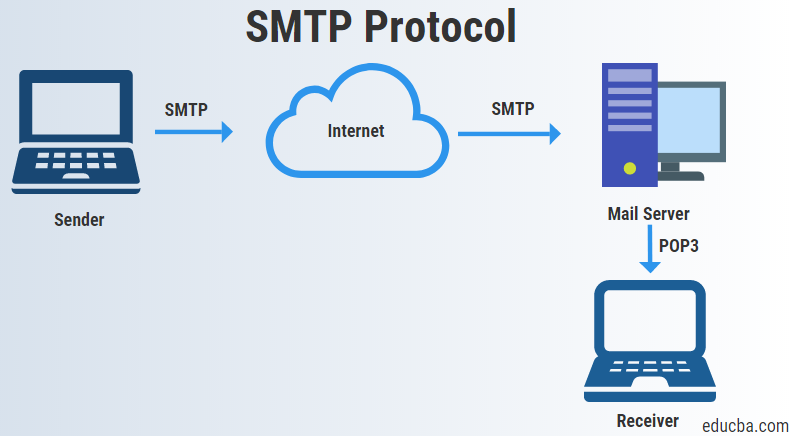
By default, SMTP does not provide encryption, meaning emails can be transmitted in plain text. Without additional protections like STARTTLS or SMTPS, messages are vulnerable to interception, making them susceptible to man-in-the-middle attacks and eavesdropping while in transit.
SMTPS secures email transmission by using TLS encryption to protect the connection between mail servers. This encryption relies on a combination of asymmetric cryptography (for authentication and key exchange) and symmetric encryption (for efficient data transfer). In contrast, standard SMTP does not encrypt messages by default, making them susceptible to interception unless protections like STARTTLS are used.
What is an SMTP Injection Attack?
Email not secured using SMTPS is vulnerable to a series of attacks that can modify the contents of a message or reroute that message to an attacker before being passed on to the intended recipient.
Attackers can exploit unencrypted SMTP communications by intercepting and potentially modifying messages in transit through man-in-the-middle attacks. However, injecting malicious SMTP commands is more commonly associated with application-layer vulnerabilities — such as improperly secured contact forms that fail to validate or sanitize input. These flaws can be abused to send spam from a legitimate domain, facilitate phishing campaigns, or expose sensitive information.
How is SMTPS Enabled?
Secure SMTP can be achieved through the enablement of TLS on your mail server. By enabling TLS, you're encrypting the SMTP protocol on the transport layer by wrapping SMTP inside of a TLS connection. This effectively secures SMTP and transforms it into SMTPS.
Port 587 and 465 are both frequently used for SMTPS traffic. Port 587 is often used to encrypt SMTP messages using STARTTLS, which allows the email client to establish secure connections by requesting that the mail server upgrade the connection through TLS.
Port 465 is used for implicit TLS (often referred to as SMTPS), where the connection is encrypted from the start. It can be used to facilitate secure communications for mail services. However, the Internet Engineering Task Force recommends using SMTP submission over port 587 with STARTTLS as the preferred standard for message submission, rather than relying on implicit TLS on port 465.
Port 2525 is sometimes used as an alternative SMTP submission port, particularly when standard ports are restricted. Many residential ISPs block port 25 to prevent users from operating unsecured or spam-generating mail servers. As a workaround, individuals and small businesses may use port 2525, which is often supported by mail service providers as an alternate submission port when ports 25 or 587 are unavailable.
System administrators can enable SMTPS through the client settings on their SMTP connector. This step will vary depending on which mail server you are running. For example, when configuring the connector in Outlook, there are options for setting the authentication type where SMTP TLS will be an option.
How Do I Know if my Emails Use SMTPS?
You can check to see if your emails are being sent securely by viewing the headers of the email in question. This can be done in most modern email clients. In Outlook, this can be done by doing the following:
Open the email you wish to check the security of.
Navigate to File tab > Properties. This will open up the email header information which will contain transmission information, including encryption details if they are being applied.
For Gmail users, verifying how an email was transmitted is straightforward. Open the message, then click the small arrow next to the recipient’s name under the sender’s address. This expands the message details, where the “Security” section shows whether the message was encrypted in transit (e.g., via TLS) and indicates authentication results such as SPF, DKIM, and DMARC. It may also display information about the sending domain.
Does SMTPS Protect Against all Email Threats?
SMTPS plays a key role in email security, but it can’t protect against all email-based threats. Emails using SMTPS are protected against:
- Man-in-the-middle attacks
- Messages being read by attackers while in transit
- Messages being forwarded to attackers
SMTPS does NOT protect against:
- Phishing attacks that use lookalike domains
- Malicious attachments that contain viruses
- Links inside of emails that redirect to malicious sites
- Emails that use social engineering to trick recipients into sharing sensitive information
- Servers sending spoof emails from domains that they do not control
Other Forms of Email Protection
Secure SMTPS keeps messages from prying eyes while in transit. But what about spoofing, and phishing, and spam? Let’s take a quick look at a few email standards you can deploy to protect your email and domain:
Sender Policy Framework (SPF): Sender Policy Framework (SPF) helps receiving mail servers verify that emails claiming to come from your domain are sent from authorized servers. It does this by publishing a list of permitted sending servers in your domain’s DNS records. When a message is received, the recipient server checks the sending IP against this list; if the IP is not authorized, the SPF check fails.
Domain Keys Identified Mail (DKIM): Provides an extra layer of email authentication by giving the messages a digital signature. DKIM helps prevent messages from being tampered with while in transit.
Domain-based Message Authentication Reporting and Conformance (DMARC): Authenticates messages by aligning SPF and DKIM capabilities.
Brand Indicators for Message Identification (BIMI): Provides domains that already use DMARC an extra layer of protection by displaying their brand logo in email messages. This helps recipients visually identify when an email is legitimate and helps companies build additional brand awareness through email campaigns.
The Fortra Advantage
Fortra DMARC Protection uses SMTPS, as well as DMARC, to encrypt email messages and prevent attacks from spoofed domains. In addition, TLS and DMARC prevent inboxes from receiving fake emails from companies who have had their email spoofed.
Phishing attacks that use lookalike domains trick unsuspecting recipients into clicking links or sending sensitive information by pretending to be a trusted sender. These attacks can occur directly over a SMTPS connection since they don’t need to abuse a lack of encryption in order to succeed.
By combining SMTPS with Fortra DMARC Protection, organizations can deploy an email security strategy that stops email-based attacks on all levels. For email protection that goes beyond SMTPS, see how Cloud Email Protection works in action, or schedule a demo to learn more.