Transport Layer Security (TLS), a cybersecurity protocol developed by the Internet Engineering Task Force (IETF), is designed to secure communications over a network by ensuring both privacy and data integrity. It evolved from Secure Sockets Layer (SSL), an earlier encryption protocol, which is why the terms SSL and TLS are still often used interchangeably when referring to encrypted internet traffic.
When it comes to email, ports like 587, 2525, and 465 are commonly used to establish secure connections for sending messages (SMTP). The right choice depends on your server configuration and security requirements. For retrieving email, protocols like IMAP and POP3 use different ports altogether, often with their own encryption settings. In many environments, system administrators can also define custom ports for secure communication across mail servers and other applications.
What is STARTTLS?
STARTTLS is a protocol command used to prompt an email server that the client wishes to upgrade the connection from an insecure connection to a secure one. STARTTLS can take an insecure connection and make it secure via TLS protocol. Having this option enabled on your mail server allows a secure connection to be established before any emails are sent.
Protection Achieved with TLS Email Encryption
TLS plays a role in protecting email communications by establishing a secure and encrypted connection between two points. Similar to DKIM, TLS utilizes asymmetric encryption to keep email communications private and untampered with while in transit. In other words, using encryption for emails ensures that the contents of the message cannot be read or modified while being sent and provides a mechanism for authentication between the sender and recipient.
Emails that use SMTP risk having their messages compromised by man-in-the-middle attacks or wiretaps if they are operating without encryption. These attacks can silently copy your emails and read their contents or even change the contents of the message while it's in transit. This not only compromises the integrity of the email, but can provide valuable information to attackers who are capable of launching even more sophisticated attacks against your domain, such as spear phishing or whaling campaigns.
Secure connections are established using a series of steps known as a "TLS handshake".

Transport Layer Security (TLS) relies on a handshake between a client and a server to establish a secure connection. When an email is sent using TLS, this handshake unfolds in several steps:
First, the client and server agree on the TLS version to use for the session.
Next, they negotiate a cipher suite—a set of algorithms that defines how encryption, key exchange, and message authentication will be handled.
The server then proves its identity by presenting its TLS certificate, which the client verifies with a trusted certificate authority.
Finally, the client and server generate shared session keys, which are used to encrypt and protect the email data for the duration of the session.
How to Tell If Your Email Is Protected by TLS
According to Google, around 90% of emails both sent and received are encrypted. But how can you check for yourself? Server administrators should be able to verify their email server is using some form of encryption by checking their certificate store and validating that their certificate is both installed correctly and up to date.
If you’re simply checking an email, you can verify if the message was sent using encryption by checking the headers of the message. In Gmail, this can be done by opening the email in question and clicking on the small arrow next to your name underneath the sender's address.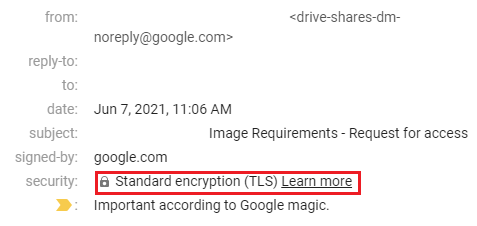
This can be done in Outlook as well by opening the email you wish to check and navigating to File > Properties. This will open up the email header information which will contain any TLS information if available.
Do You Need More Than TLS to Secure Your Email?
TLS plays a vital role in email security, but it can’t protect against all email-based threats. Emails using encryption are protected against:
- Man-in-the-middle attacks
- Messages read or eavesdropped on by attackers while in transit
- Messages being forwarded to attackers
However, TLS cannot protect emails from:
- Phishing attempts using lookalike domains
- Malicious attachments that contain viruses
- Links inside of emails that redirect to phishing sites
- Emails that use social engineering to trick recipients into sharing sensitive information
- Servers sending spoof emails from domains that they do not control or defend
Strengthening Email Security with TLS and DMARC Protection
Fortra's Email Security solutions utilize TLS email and DMARC protocols to ensure that emails are encrypted, as well as protected against phishing attacks from domain spoofing. Phishing attacks that use lookalike domains trick unsuspecting recipients into clicking links or sending sensitive information by pretending to be a trusted sender. These attacks can occur directly over a secure connection since they don’t have to abuse a lack of encryption to succeed.
By combining TLS email encryption, organizations can deploy a security strategy that stops email-based attacks at all levels.